
Anthropic has just released a new guide that changes how AI agents use tools, cutting token use by 98% and significantly speeding up workflows.
AI Twitter has just gone into a frenzy over a new Anthropic guide that’s changing what everyone thought about the best way to build AI agents.
This changes how we think about building AI agents because it solves one of the most common problems plaguing agent development today.
So what’s this problem about?
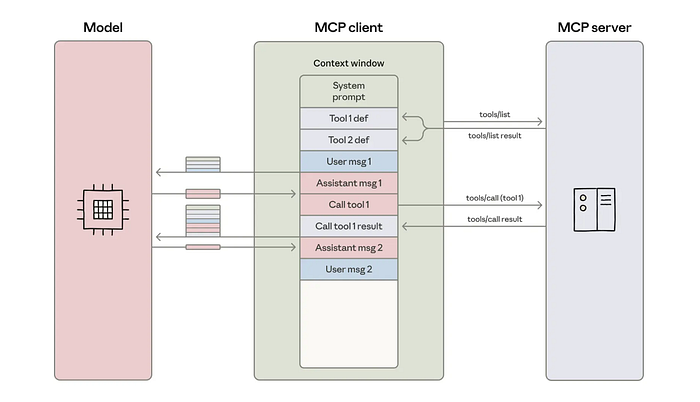
When you’re building AI agents with multiple tools, they consume context windows.
We’re talking about 150,000+ tokens for complex workflows.
Your agent needs to load every single tool definition upfront, pass intermediate results back and forth through the context window, and keep everything in memory even when it’s not actively being used.
This creates three massive headaches:
- Cost. Those tokens add up fast. Running complex agent workflows becomes expensive, especially at scale.
- Latency. More tokens mean slower responses. Your agent spends time processing information that it might not even need.
- Tool limitations. You hit context window limits quickly, which means you can’t give your agent access to as many tools as you’d like.
So what’s the quick solution for this?
Anthropic figured out something innovative.
Instead of making your agent call tools through the traditional method, you treat MCP servers as code APIs. Your agent writes code to interact with tools, rather than making direct tool calls for each action.
This results in workflows that previously consumed 150,000 tokens now using just 2,000 tokens, which is a 98.7% reduction.
Let’s break it down further.
Problem with Building AI Agents
When you build AI agents, they need tools to do anything useful.
When do you want it to search databases? That’s a tool. Need it to send emails? Another tool. Access Salesforce, Slack, GitHub? More tools.
The problem starts when you connect your agent to dozens or hundreds of tools through MCP servers.
Token Overhead Nightmare
With direct tool calling, every single tool definition gets loaded into your agent’s context window upfront.
Before your agent takes any action, they need to be aware of every tool available.
It’s like handing someone a 500-page instruction manual before they can make a simple phone call.
Each tool definition includes:
- What the tool does
- What parameters it accepts
- What format it expects
- What it returns
Multiply that by 50, 100, or 200 tools, and you’re looking at massive token consumption before your agent even starts working.
And that’s where the problem begins.
Intermediate Results Problem
Every time your agent calls a tool, the result comes back through the context window.
If your agent needs to chain multiple tool calls together, each intermediate result adds more tokens.
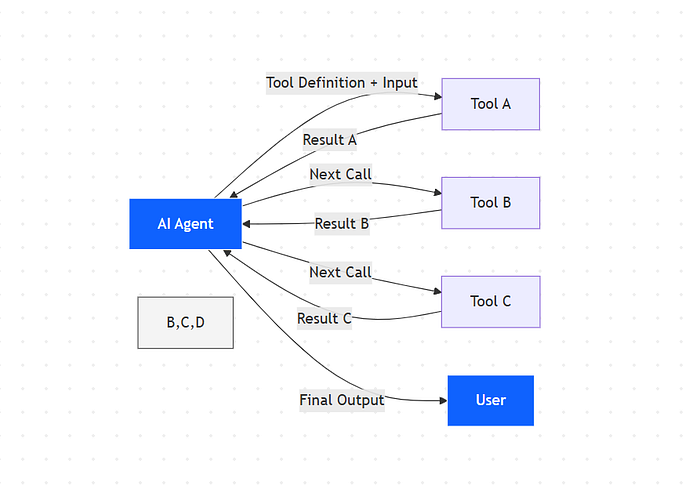
Agent calls Tool A → Result flows through context → Agent processes → Calls Tool B → Another result through context → Agent processes → Calls Tool C…
You see where this is going.
For complex workflows that require 10, 20, or 30 tool calls, you’re passing massive amounts of data back and forth through the context window.
Data that often needs simple processing before moving to the next step.
Kills Your Application
This creates problems:
- Your costs spiral — More tokens mean higher API bills. A workflow that should cost pennies ends up costing dollars.
- Everything runs slowly — The model has to process all those tokens. More tokens equal more latency. Your users wait longer for responses.
- You hit limits fast — Context windows have caps. When you’re burning 150,000 tokens on tool definitions and intermediate results, you run out of space for the actual task.
- Scaling becomes impossible — Want to add more tools? Each one makes the problem worse. You’re forced to choose between functionality and efficiency.
This approach works fine when agents use 3–5 tools. But complex AI applications need access to entire ecosystems of tools.
We need a scalable solution. So how do you fix this?
Solution — Code Execution with MCP
Anthropic’s solution is simple once you understand it.
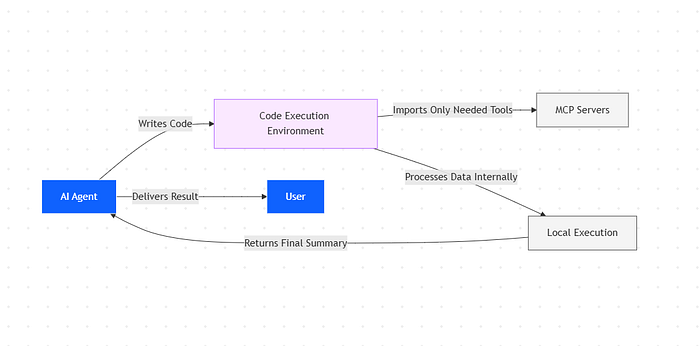
As code execution environments become more prevalent for agents, the solution is to present MCP servers as code APIs rather than direct tool calls.
The agent writes code to interact with MCP servers.
This approach addresses both challenges: agents can load only the tools they need and process data in the execution environment before passing results back to the model.
Here’s the key difference:
- Current approach: Agent uses tool calling API → Model loads all tool definitions → Model calls tools directly → Results come back through context
- Code execution approach: Agent writes code → Code imports only needed tools → Code executes and processes data → Only final results return to the model
Your MCP servers become code APIs. Instead of exposing tools as function calls that the model invokes directly, you present them as modules the agent can import and use programmatically.
Think TypeScript modules, Python packages, or any other code library.
How It Works in Practice
Let’s say your agent needs to search through Salesforce records, filter the results, and create a summary.
Current way:
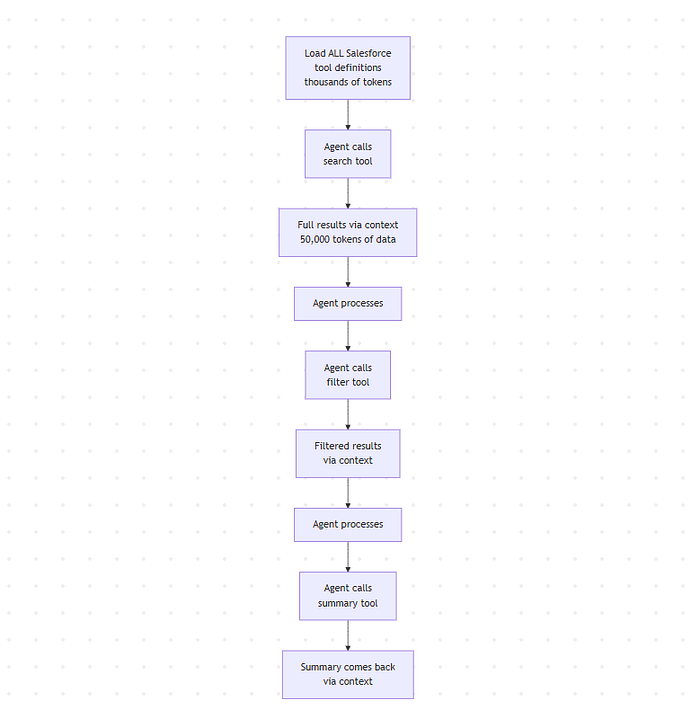
- Load all Salesforce tool definitions into context (thousands of tokens)
- Agent calls the search tool
- Full results come back through context (could be 50,000 tokens of data)
- Agent processes and calls filter tool
- Filtered results through context
- Agent calls summary tool
- Summary comes back
Here’s what that looks like with current tool calls:
# Traditional approach - each step is a separate tool call

# Step 1: Search (tool call 1)
search_results = agent.call_tool("search_salesforce", {
    "query": "active accounts",
    "fields": ["name", "revenue", "status"]
})
# Returns 1000 records, all flow through context
# Step 2: Filter (tool call 2)
filtered_results = agent.call_tool("filter_records", {
    "data": search_results,  # Passing large dataset through context
    "condition": "revenue > 1000000"
})
# Filtered data flows back through context
# Step 3: Summarize (tool call 3)
summary = agent.call_tool("create_summary", {
    "data": filtered_results  # More data through context
})
# Total: 3 separate tool calls, all intermediate data through context
Code execution way:
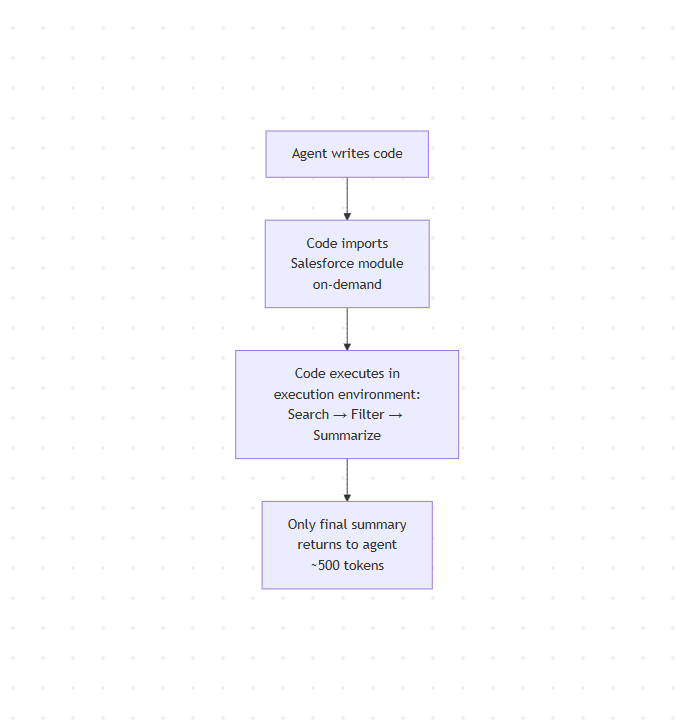
- The agent writes code that imports the Salesforce module
- Code searches, filters, and summarizes in one execution
- Only the final summary returns to the agent (maybe 500 tokens)
Here’s what the agent writes with code execution:
// Code execution approach - single execution, all processing in environment

import { salesforce } from 'mcp-servers';

// Everything happens in the execution environment
async function getSalesforceSummary() {
    // Search
    const results = await salesforce.search({
        query: "active accounts",
        fields: ["name", "revenue", "status"]
    });
    // 1000 records - but they never touch the model's context

    // Filter (happens right here in code)
    const filtered = results.filter(record => record.revenue > 1000000);
    // Filtered to 50 records - still in execution environment

    // Summarize (still in code)
    const summary = {
        total_accounts: filtered.length,
        total_revenue: filtered.reduce((sum, r) => sum + r.revenue, 0),
        top_account: filtered.sort((a, b) => b.revenue - a.revenue)[0]
    };

    return summary;  // Only this small object goes back to the model
}
// Agent gets back just the summary - maybe 100 tokens
The intermediate data never touches the model’s context. It all happens in the code execution environment.
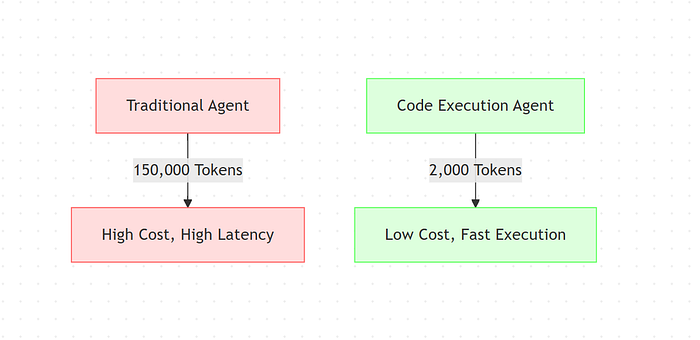
When Anthropic tested this approach, workflows that previously consumed 150,000 tokens were reduced to 2,000 tokens.
But,
Token savings aren’t the only benefit; everything runs faster since you’re executing code instead of chaining tool calls.
Your agent can use loops, conditionals, and error handling with native code constructs as opposed to making sequential API calls.
But there is a trade-off.
This approach adds complexity as you now need a secure code execution environment with proper sandboxing, resource limits, and monitoring, which is not needed with direct tool calls.
But for production AI applications that need to scale, the benefits far outweigh the setup cost.
You get cheaper operations, faster responses, and the ability to connect your agent to hundreds of tools without hitting context limits.
Now let’s look at the specific benefits of this approach.
7 Key Benefits
Here’s what you get when you implement code execution with MCP.
1. Massive Token Efficiency
Reducing workflows from 150,000 tokens to 2,000 tokens means your API costs drop by over 98%.
Lower token usage means you can build more complex agents without worrying about hitting context limits. You can give your agent access to more tools, handle longer conversations, and process larger datasets.
2. Progressive Tool Discovery
Your agent can browse available tools, search for specific functionality, or read documentation only when needed. It doesn’t need to memorize the entire tool catalog before starting work.
You can even implement a
search_toolsfunction that lets your agent find relevant tools based on the current task. This solves the context bloat problem completely.
3. In-Environment Data Processing
Your agent can filter, transform, and aggregate data within the code execution environment before it reaches the model.
Say you’re working with a spreadsheet that has 10,000 rows. With traditional tool calling, all 10,000 rows would come back through the context window. With code execution, your agent writes code that filters those 10,000 rows down to the five relevant ones before passing them to the model.
4. Better Control Flow
Writing code gives your agent access to proper programming constructs.
This reduces both latency and token consumption. Instead of making 50 separate tool calls with 50 round-trip calls to the model, your agent writes code that handles all 50 operations in a single execution.
5. Privacy Advantages
Sensitive data can flow through your workflows without ever entering the model’s context.
Only explicitly logged or returned values become visible to the model. Everything else stays in the execution environment. You can process confidential information, make decisions based on it, and return only the final result.